
GG Game Space: official Android game tools
Welcome to the official GG Game Space website. Discover the Android app, explore the tools shown in its screenshots, check setup information, and get the app from Google Play.
Tool availability can vary by game and device.

About GG Game Space
GG Game Space keeps your game tools in one place. Add your games to the app, then bring up the tool panel without leaving the game.
It is built for mobile players who want controls, display and device tools within reach while they play.
Tools you can see in the app
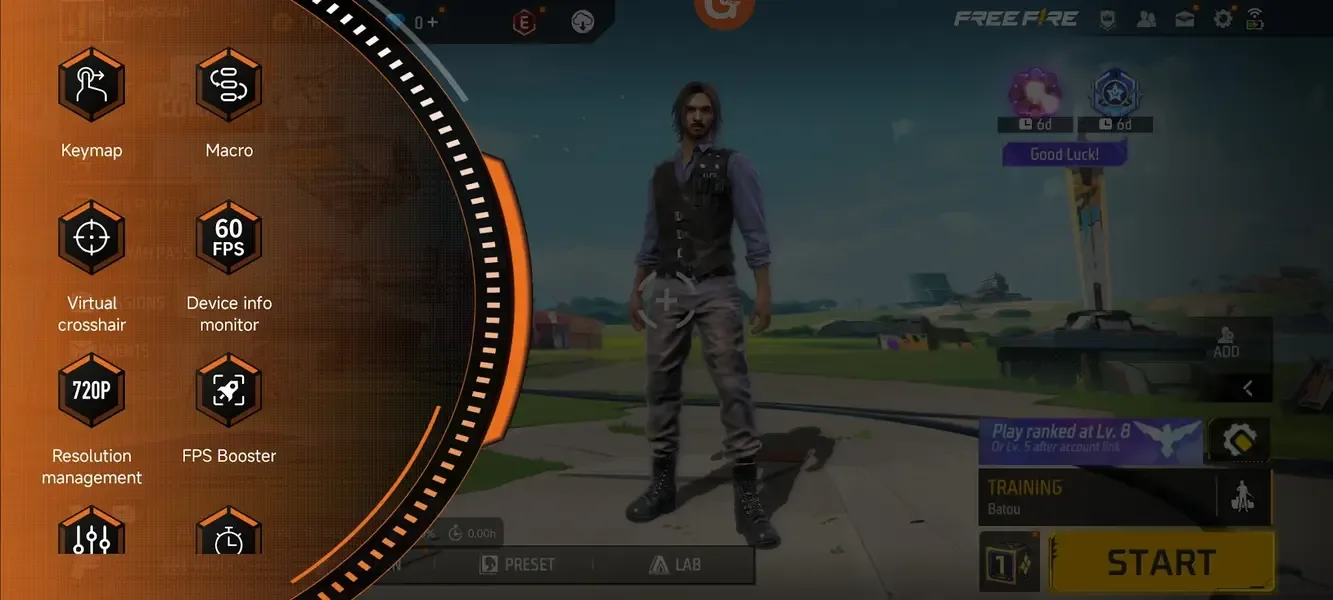
The Google Play listing describes 100+ tools. These examples are visible in the app screenshots; availability and behavior can vary by game and device.
Keymap
Control mapping, found in the tool panel.
Macro
Macro tools, found in the tool panel.
Virtual Crosshair
An on-screen crosshair shown over the game.
Device Info Monitor
A readout of device information while you play.
Resolution Management
Resolution settings, listed in the tool panel.
FPS Booster
A frame-rate tool. Results depend on the game and device.
Volume and Brightness
Slider controls for volume and screen brightness.
The panel, in the game
How it works
Add your games
The app keeps an Added Games list. Add the games you play to it.
Open a game
The tool panel appears over the game, as shown in the screenshots.
Pick a tool
Choose a tool from the panel, such as Keymap or Resolution management.
Install from the Google Play listing. Device setup can differ by manufacturer.
Compatibility and requirements
Requirements below reflect developer-provided information. Compatibility can vary, and the Play Store listing does not name a verified supported-games list.
- Platform
- Android
- Minimum version
- Android 11 or later
- Root access
- Root is not required; the developer states the app also works on rooted devices.
- Setup
- The developer advises setting battery usage to unrestricted and enabling USB debugging. Steps and availability vary by device.
- Supported games
- The Play Store listing does not publish a verified compatibility list. Check the listing and test your device and game.
Download
Download GG Game Space from its official Google Play listing.
FAQ
What is GG Game Space?
The Google Play listing describes GG Game Space as an app with 100+ game tools. The screenshots on this page show a selection, including keymap, macro, virtual crosshair, device information, resolution and FPS tools.
How do I get started?
Install from Google Play, add games in the app, then open a game to access its panel. Setup requirements can vary by device.
Which games and devices are supported?
The Play Store listing does not publish a verified compatibility list. The app requires Android 11 or later according to the developer; support can still vary by game and device.
Will the performance tools improve my device?
Results depend on the game and device. The listing does not provide performance guarantees or benchmarks.
Where do I download it?
Use the GG Game Space listing on Google Play.
Where can I get help?
Email sahil@ggmousepro.com or visit the GG Game Space support page.
Support
Email sahil@ggmousepro.com or visit the GG Game Space support page.
Join the WhatsApp community, Discord server, or follow Instagram.